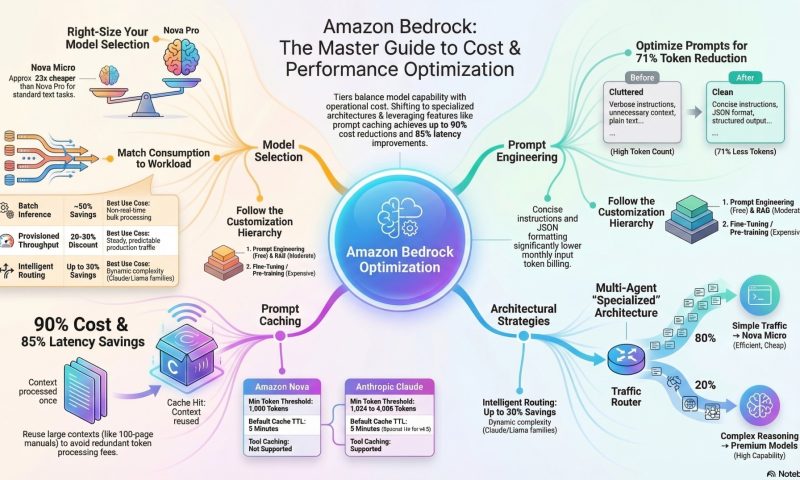
By applying the right architectural patterns, prompt strategies, and monitoring techniques, teams can dramatically improve performance while reducing operational expenses.
1. Master Prompt Caching for Maximum Savings
Prompt caching can reduce costs by up to 90% and latency by 85% by reusing previously processed context.
- Structure Prompts Strategically: Always place static, repetitive content—such as system instructions, reference documents, or few-shot examples—at the beginning of the prompt.
- Place dynamic, user-specific queries at the very end.
- Respect Token Thresholds: Caching only activates once a minimum token count is reached. For most Claude models (like 3.7 Sonnet), the minimum is 1,024 tokens. If your content is shorter, it will not be cached.
- Manage Your TTL (Time To Live):
- The default TTL is 5 minutes, which resets with every cache hit.
- For long-running sessions or intermittent users, use the 1-hour TTL option available on premium models like Claude 4.5 and Sonnet 4.5.
- Leverage Simplified Cache Management: For Claude models, you can place a single checkpoint at the end of static content; Bedrock will automatically look back up to 20 content blocks to find the best match.
- Keep the Cache “Warm”: For high-frequency workloads, ensure requests are sent within the 5-minute window to prevent the cache from expiring and incurring re-processing costs
2.Optimize Model Selection and Routing
Choosing the right model is often the biggest lever for controlling costs.
- Use the “Right-Sized” Model: Don’t use a premium model for simple tasks. Amazon Nova Micro is approximately 23x cheaper than Nova Pro for the same input tokens.
- Implement Intelligent Prompt Routing: Use this feature to automatically route requests within a model family (e.g., Claude 3.5 Sonnet vs. Claude 3 Haiku). It predicts query complexity and selects the most cost-effective model, saving up to 30% without losing accuracy.
- Tier Your Architecture: Build a tiered strategy where a small model (like Nova Micro) handles 80% of routine traffic, while a more powerful model is reserved for the 20% of complex technical queries
3. Efficiency in Prompt Engineering
Well-crafted prompts reduce token consumption and improve response quality.
- Be Concise: Remove redundant instructions and unnecessary filler words. Optimized prompts can reduce input token counts by over 70%.
- Define Output Formats: Explicitly request structured outputs like JSON or Markdown. This prevents the model from generating verbose, conversational “fluff” that wastes output tokens.
- Use Few-Shot Examples: Provide 2–3 high-quality examples instead of long-winded explanations to guide the model’s behavior.
- Set Token Limits: Always use the
max_tokensparameter to prevent runaway costs from unexpectedly long model responses
4. Advanced Architectural Strategies
- Adopt Multi-Agent Systems: Instead of one large “monolithic” agent, use a supervisor agent (running on a cheap model) to route tasks to specialized, smaller agents.
- Utilize Batch Inference: For tasks that don’t require real-time responses (like nightly content moderation), use Batch mode to receive a 50% discount compared to on-demand pricing.
- Implement Client-Side Caching: Combine Bedrock’s internal caching with your own local cache (like Redis) for exact prompt matches. This can lead to an additional 15–20% total cost reduction by avoiding API calls entirely.
- Progressive Customization: Always start with Prompt Engineering (zero cost), move to RAG (moderate cost), and only consider Fine-tuning (high cost) if accuracy requirements aren’t met
5. Monitor and Manage Costs Programmatically
- Use Application Inference Profiles: Create custom profiles for different departments or apps. This allows you to use cost allocation tags to track exactly which project is spending what.
- Set CloudWatch Alarms: Monitor metrics like
InputTokenCount,OutputTokenCount, andInvocations. Set alerts for unusual spending patterns to catch “infinite loops” or accidental deployments early.
- Track Cache Metrics: Review
cacheReadInputTokensandcacheWriteInputTokensin your API responses to verify that your caching strategy is actually working
Source :
https://aws.amazon.com/blogs/machine-learning/effectively-use-prompt-caching-on-amazon-bedrock/
https://docs.aws.amazon.com/bedrock/latest/userguide/prompt-caching.html
https://caylent.com/blog/prompt-caching-saving-time-and-money-in-llm-applications